

Aggrega Your feeds · One edition

Aggrega

Your feeds · One edition

A fast, local-first desktop feed reader with the calm of a morning paper. It runs entirely on your computer and minds its own business.

Free and open source · MIT · Linux & macOS

Aggrega in the light theme: a sidebar of sources on the left and a newspaper-style list of articles with a lead story. Aggrega in the dark theme.

Nothing to report

Aggrega reads the news. It doesn't make any about you.

Lead story

No telemetry. Not a single ping.

There is no telemetry, tracking or analytics code in Aggrega. Not opt-in, not anonymised, not “just crash reports.” It doesn't phone home, doesn't check in, and doesn't count you.

Everything Aggrega sends over the network

  • Requests for the feeds you subscribed toYes
  • Thumbnails and articles from those feedsYes
  • Other copies of Aggrega on your LAN, only while Settings → Sync is openYes
  • Usage statistics, crash reports, update checksNever
  • Ad networks, analytics, “partners”Never
  • An Aggrega server of any kindThere isn't one
No account

No sign-up, no login, no cloud.

Open it and start reading. Your subscriptions, articles and read state live in a single SQLite file on your own disk, and nowhere else.

No tracking

Nobody is watching you read.

No identifiers, no fingerprinting, no reading history leaving your machine. The only party that sees a request is the site you subscribed to.

No ads

The only thing on the page is the story.

No sponsored posts, no promoted sources, no upsell. The reader view strips menus, share bars and comment widgets out of the page too.

Works offline

Read on the train. Or the plane.

Stories and thumbnails you've downloaded stay readable with no connection. Offline, Aggrega says so instead of flagging your sources as broken, and catches up when you're back.

On your disk

Two folders. That's all of it. Delete them and Aggrega forgets everything.

WhatLinuxmacOS
Subscriptions, articles, read state, settings ~/.local/share/aggrega/aggrega.db ~/Library/Application Support/aggrega/aggrega.db
Thumbnail cache (safe to delete) ~/.cache/aggrega/thumbs/ ~/Library/Caches/aggrega/thumbs/

Moving to another computer? Settings → Sync pulls another machine's database straight over your local network, between macOS and Linux. Nothing listens or announces itself unless the Sync tab is on screen. OPML import and export work with Feedly, Inoreader, NetNewsWire, Miniflux and every other reader.

A proper reader

Small, quick and quiet, with a design borrowed from the newsroom.

Every format

RSS 0.9x, 1.0 and 2.0, Atom and JSON Feed, from as many sources as you like.

Smart “Add source”

Paste a feed URL, or just theverge.com. Aggrega finds the feed for you.

Reader view

A clean single column with headline, photo and text. Summary-only feeds get the full story pulled in, and it's saved for offline.

Refreshes politely

In parallel, in the background, on your schedule. Conditional requests mean unchanged feeds cost almost nothing.

LAN sync & OPML

Bring your subscriptions from any reader, and move them between computers without a cloud in between.

Light & dark

Newsprint paper or late-edition ink. Follows your desktop, or pick one and it remembers.

Light on resources

One native Rust binary. No browser engine inside, and zero CPU while it sits idle.

Keyboard friendly

F5 to refresh, O to open the original, M to mark read, Esc to go back.

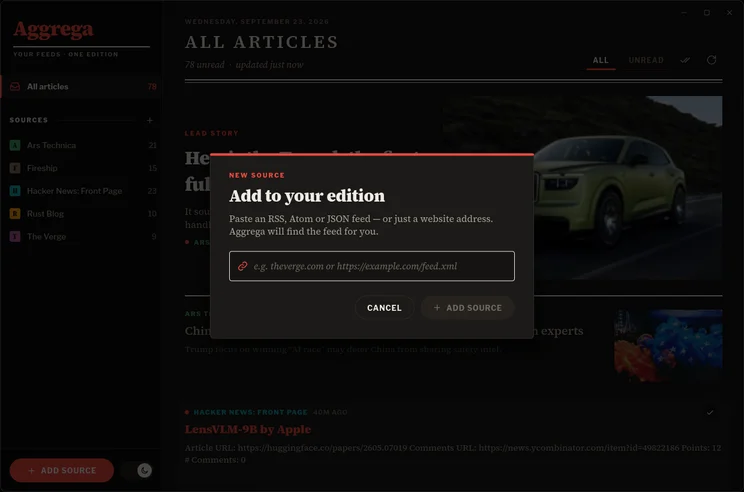
The Add source dialog, with a field for a website or feed address.

Add source

Just type the website.

Aggrega looks for the feed in the page's <link rel="alternate"> tags or at common paths like /feed and /rss.xml. Coming from another reader? Import from OPML is right on the welcome screen.

Free, open, yours

MIT licensed. No account to create before you can try it.

Arch Linux

Build it in a minute

sudo pacman -S --needed base-devel rustup fontconfig freetype2 libxkbcommon wayland libglvnd
rustup default stable
git clone https://github.com/moebiusmania/aggrega
cd aggrega/packaging/arch && makepkg -si

Installs a proper package with a launcher entry and icon. Other distros: see the build guide.

macOS

Apple silicon, macOS 11+

Each release builds Aggrega.app as a disk image. The app isn't notarized, so the first launch needs Open Anyway under System Settings → Privacy & Security.